How to Create a Stunning, Free Linktree on Scale Selling CRM
Are you still paying for a third-party "link in bio" tool? Or maybe you are using a free version that clutters your professional page with someone else’s logo?
If you are using Scale Selling CRM, you already have a powerful, fully customizable Linktree alternative built right into your dashboard.
Stop sending your valuable social media traffic to a third-party platform. Keep them in your ecosystem, track their data, and boost your conversions with a bio link page that you own completely.
Here is the step-by-step guide on how to build one in minutes using our library of over 500+ templates.
Why Build Your "Link in Bio" on Scale Selling?
Before we get to the "how-to," here is why you should make the switch today:
It’s Free: Included with your Scale Selling CRM. No monthly fees, unlimited contacts and unlimited users for "Pro" features.
Total Customization: No design limits. Change backgrounds, buttons, fonts, and videos to match your brand perfectly.
Better Tracking: Because this is your website, you can add your Facebook Pixel or Google Analytics tag to retarget anyone who clicks your link.
Instant Lead Capture: Instead of just linking out, you can embed forms to capture emails or phone numbers directly on the page.
Step-by-Step Guide: Creating Your Link Page
You don't need to be a web designer or know how to code. Follow these five simple steps to get your page live.
1. Log In to Scale Selling
Open your Scale Selling CRM dashboard.
2. Navigate to Sites
On the left-hand sidebar menu, click on the tab labeled Sites.
3. Start a New Website
Once inside the Sites section, ensure you are on the Websites tab at the top. Click the button that says + Create New Website.
4. Browse the Template Library
You will be asked to name your website or choose a template. Select From Templates.
In the search bar, type "Link".
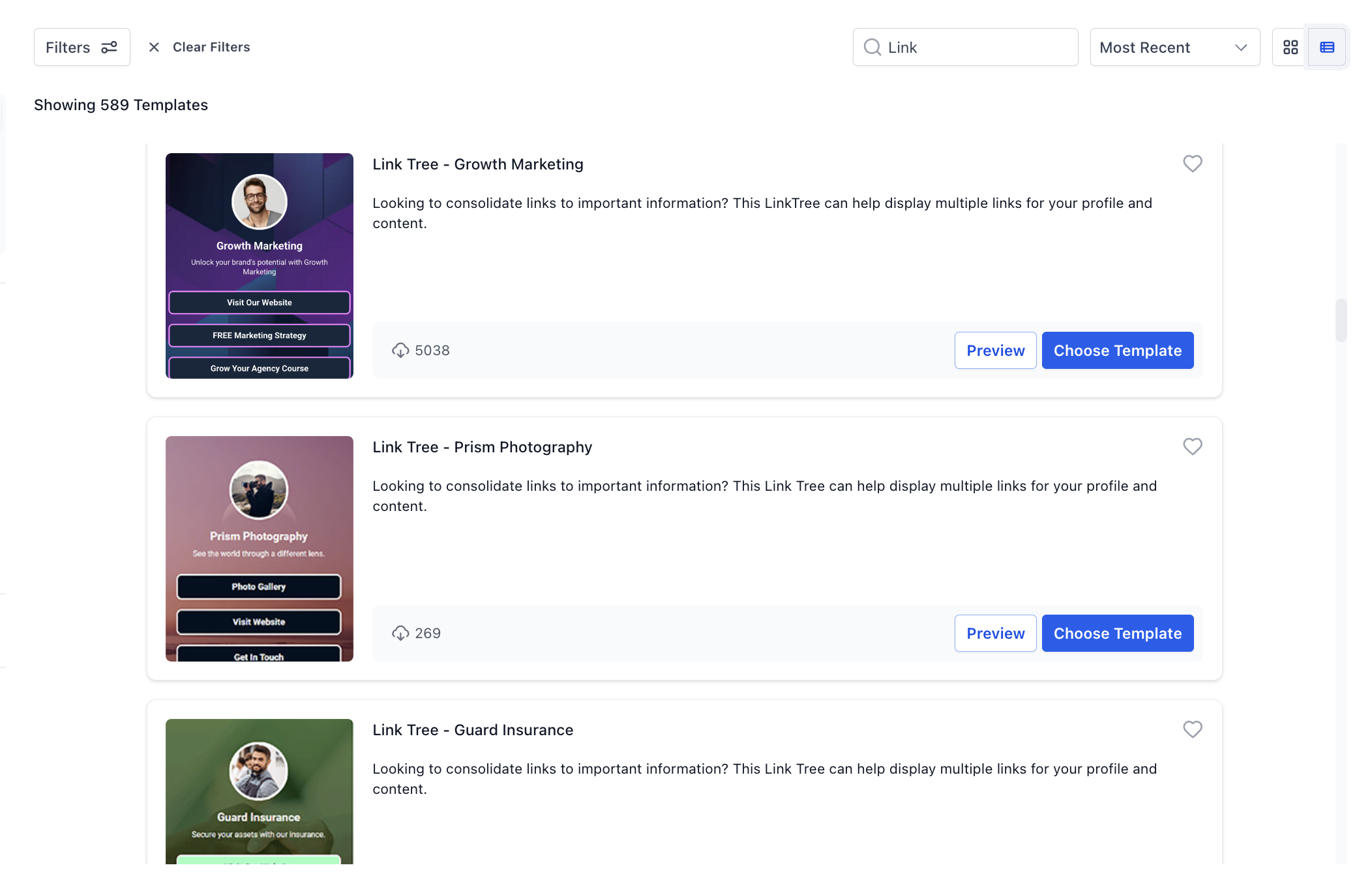
500+ Link Tree Templates to use or customize!
5. Select Your Design
You will instantly see 500+ Linktree templates appear. These range from minimalist designs to bold, creative layouts.
Preview: Click the "Eye" icon to preview how the template looks on mobile and desktop.
Select: Once you find one you like, select it to load it into the builder.
6. Customize and Publish
Now comes the fun part. Use the drag-and-drop editor to:
Swap out the profile photo for your own.
Update the button text (e.g., "Book a Call," "Visit My Shop," "Read the Blog").
Link the buttons to your actual destination URLs.
Change the colors to match your brand identity.
Once you are happy with the look, hit Save and Publish. Connect your domain, and you are ready to paste the link into your Instagram, TikTok, or LinkedIn bio!
Pro Tip: What to Include on Your Link Page
To get the most out of your new Scale Selling link page, ensure you include these high-value elements:
A Lead Magnet: Offer a free guide or checklist in exchange for an email address.
Your "Money" Offer: The direct link to your primary service or product.
Social Proof: A quick testimonial, 5-star review graphic or a link to your Google My Business with lots of reviews.
Contact Option: A direct link to WhatsApp or your calendar.
Set Up a Custom Domain
To make it professional, use your own domain (e.g., links.yourbusiness.com instead of a generic link).
Go to Settings > Domains.
Add your domain and configure the CNAME record with your domain registrar.
Go back to Sites > Funnels > Settings and assign this domain to your new page.
Ready to upgrade your social media presence? Log in to Scale Selling CRM now and build your free link page today!
Why Build your Linktree on Scale Selling vs Other Platforms?
Building your link hub on Scale Selling CRM in 2026 offers significant strategic advantages over third-party tools like Linktree, specifically in data ownership, conversion rates, and long-term cost savings.
1. Data Ownership & Advanced Tracking
Retargeting Control: When you use Scale Selling, the page is hosted on your domain. This allows you to install your own tracking pixels (Meta, Google, TikTok) to retarget visitors with ads later. Standard Linktree users often have to pay for "Pro" plans to access these basic remarketing features.
Zero Data Leakage: Directing traffic to a third-party site like Linktree gives them the data on your audience's behavior. By hosting on your CRM, you keep 100% of your visitor analytics in-house.
2. Superior Lead Capture & Automation
Direct CRM Integration: Any lead captured via a form or calendar on your Scale Selling link page immediately triggers automated workflows (email/SMS follow-ups). Linktree requires additional steps or third-party integrations (like Zapier) to move data into your CRM.
Native Booking: You can embed your live booking calendar directly on the page, allowing prospects to schedule calls without ever leaving your "link in bio" ecosystem.
3. SEO & Branding Benefits
SEO Domain Authority: Every click to your link-in-bio page counts as traffic to your primary website domain, improving your overall search engine rankings. Using Linktreehelps Linktree’s SEO, not yours.
Total Brand Control: Unlike the restricted templates of other tools, you have unlimited design freedom to match your brand's exact colors, fonts, and layout without "Powered by..." logos.
4. Cost Efficiency
Consolidated Subscriptions: Scale Selling CRM includes these landing page features at no extra cost. You can cancel monthly "Pro" subscriptions for link-in-bio tools, which often charge $5–$25/month for features like custom domains and advanced analytics.
Unlimited Capacity: While some tools limit the number of links or pages, Scale Selling typically allows for unlimited funnels and steps, letting you create unique link hubs for different social campaigns.
Summary Comparison (2026)
Key Advantages of Scale Selling over Linktree
No Extra Cost: You don't need a separate subscription for a "Pro" link-in-bio tool.
Retargeting: Since it's hosted on your site, you can install tracking pixels (like Meta or Google) to retarget visitors with ads.
Instant Lead Entry: Any form filled out on this page triggers automated workflows (email/SMS follow-ups) within Scale Selling CRM.
Ready to build your own proprietary Linktree like a pro? Log in to Scale Selling CRM now and build your 100% free link tree today!